Technologies · Redeem

Redeem.

An offline AI rescue USB for fixing PCs that won't boot. Version 1.9.0. Hugging Face main is commit 1169fb87, tag v1.9.0.

Redeem is a bootable USB with a local AI troubleshooting assistant that runs entirely on the PC's own CPU, with no internet needed. Plug it into a dead or misbehaving computer, boot from it, and chat through disk, boot, and BitLocker problems using your machine's real diagnostics.

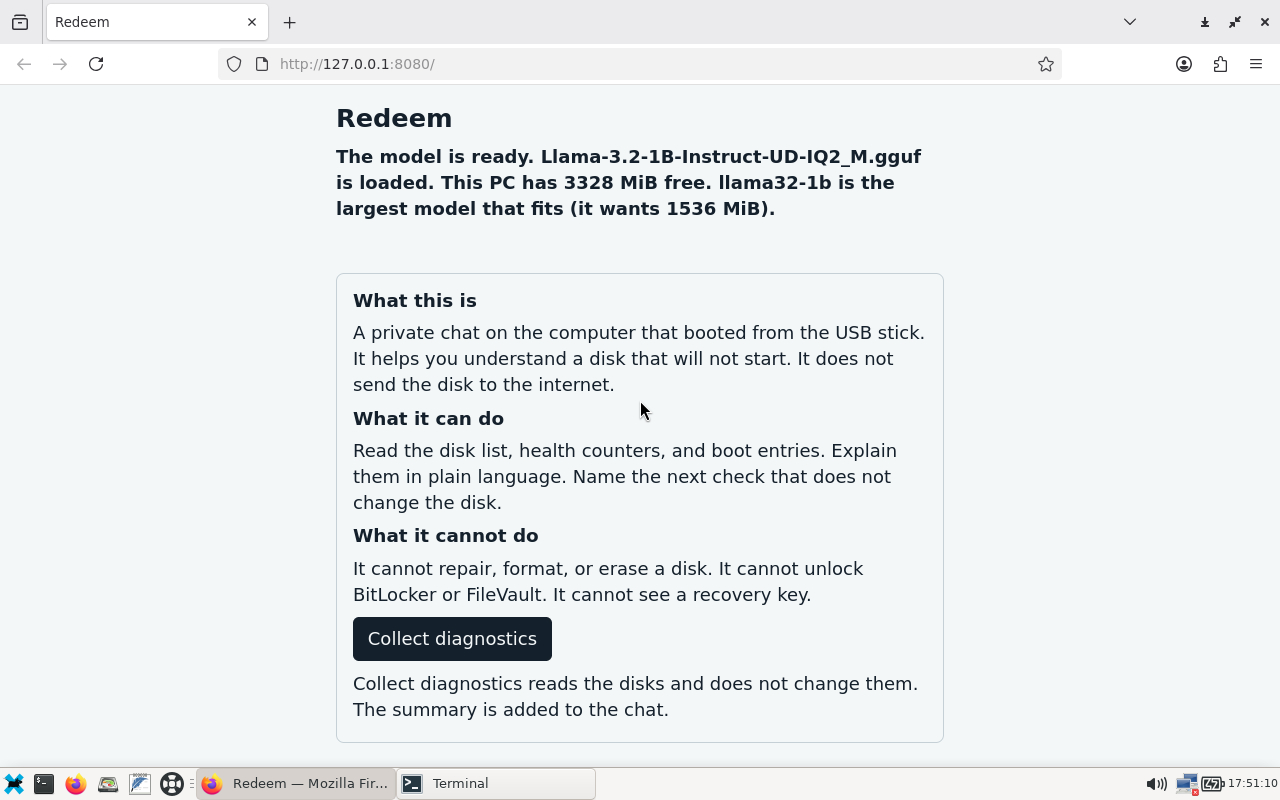
Redeem first screen: the local chat says the model is ready and offers Collect diagnostics
Redeem's first screen

What it does

  • Works fully offline with a CPU-only local AI.
  • Collects disk and boot diagnostics automatically.
  • BitLocker triage and safe read-only unlock.
  • Optional phone and tablet access over local Wi-Fi with a one-time code.
  • One-click USB maker for Windows, macOS, and Linux.
  • Guarded fix mode: safe checks run only after you approve.
  • Phone and tablet fixes over USB: Android (adb) and iPhone/iPad (Trust pairing) get device info, log collection, file and photo copy, and safe reboots, each approved on the rescue PC.
  • Phone OS flashing: Android via fastboot on already unlocked bootloaders, and iPhone/iPad restores of Apple-signed firmware, each behind backup and typed-serial gates on the rescue PC.
  • Full image only: the boot menu also offers Alpine Linux, Memtest86+ for RAM testing, and Finnix. Redeem stays the default. These boot separately, without the AI chat or Approve safeguards.
  • Redeem can now run an owner-driven Android bootloader unlock and relock from the rescue PC. It is Approve-only on the rescue PC, uses the phone maker's official OEM unlocking plus fastboot path, and never bypasses FRP or activation lock.
  • Optional iPhone control for broken screens: mirror the iPhone to the rescue PC over AirPlay on an offline hotspot and drive it as a Bluetooth mouse and keyboard, with no jailbreak or bypass.
  • A chat command queue for phone steps that runs only after one Approve on the rescue PC.
  • The chat now opens knowing the PC's maker, model and boot mode.
  • One 32GB or larger stick can carry both builds. Redeem picks full on PCs with 8GB of RAM or more and slim on smaller ones, with five seconds to switch.
  • The Make Redeem USB installers now write the image straight to the drive with a small progress screen on Windows, macOS and Linux, and Windows flashing handles drives that Windows tries to grab mid-write.
  • New Redeem TV build for testing: it connects to Android and Google TV over network adb, removes preinstalled bloat with Free My TV lists you can restore, and includes a remote for adb, Roku, Samsung, LG and HDMI-CEC TVs. Slim and full now point you to Redeem TV when they detect a TV.
What's new

Guarded fix mode. The AI can offer safe checks (read-only mount, copying files to another USB, a diagnostics rescan, a short SMART test, check-only disk scans) on a card that shows the exact command and its risk. Nothing runs until the person at the rescue PC presses Approve, and phones can't approve. Repairs and BitLocker decrypt are shown but not run yet.

Phone and tablet fixes over USB: Android (adb) and iPhone/iPad (Trust pairing) get device info, log collection, file and photo copy, and safe reboots, each approved on the rescue PC. Phone OS flashing: Android via fastboot on already unlocked bootloaders, and iPhone/iPad restores of Apple-signed firmware, each behind backup and typed-serial gates on the rescue PC. Android flashing checks the image matches the device and its hash. iOS restores need internet for Apple signing. It never bypasses FRP or activation lock. Redeem ships no OS images, so you bring your own on the stick. Factory reset and wipe are shown as high-risk and never run, and the phone itself can't approve actions. Approval happens only on the rescue PC.

Redeem can now run an owner-driven Android bootloader unlock and relock from the rescue PC. It is Approve-only on the rescue PC, uses the phone maker's official OEM unlocking plus fastboot path, and never bypasses FRP or activation lock. The README (access required) has a guide to unlocking a bootloader yourself.

Full image only: the boot menu also offers Alpine Linux, Memtest86+ for RAM testing, and Finnix. Redeem stays the default. Slim does not include them. These boot separately, without the AI chat or Approve safeguards. The README (access required) has a guide to booting each one.

Optional iPhone control for broken screens: mirror the iPhone to the rescue PC over AirPlay on an offline hotspot and drive it as a Bluetooth mouse and keyboard, with no jailbreak or bypass. A chat command queue for phone steps runs only after one Approve on the rescue PC. The chat now opens knowing the PC's maker, model and boot mode. One 32GB or larger stick can carry both builds. Redeem picks full on PCs with 8GB of RAM or more and slim on smaller ones, with five seconds to switch. The Make Redeem USB installers now write the image straight to the drive with a small progress screen on Windows, macOS and Linux, and Windows flashing handles drives that Windows tries to grab mid-write. New Redeem TV build for testing: it connects to Android and Google TV over network adb, removes preinstalled bloat with Free My TV lists you can restore, and includes a remote for adb, Roku, Samsung, LG and HDMI-CEC TVs. Slim and full now point you to Redeem TV when they detect a TV.

Install

Make Redeem USB

The easiest way is to download redeem-installers.zip (access required) and run Make Redeem USB. On Windows, double-click Make-Redeem-USB.bat. On macOS, double-click Make-Redeem-USB.command. On Linux, run bash make-redeem-usb.sh. Pick your USB stick and type its name to confirm. The installer downloads the image and writes it for you.

Flash an image

Another way: download an .img.xz image and flash it with balenaEtcher. You do not need to unzip it first.

Quick start

Plug the USB into the broken PC and open the boot menu (usually F12, F11, F9, Esc, or Option on Intel Macs). Pick the USB and the chat opens by itself.

It works with Secure Boot after a one-time key enroll. The repo README (access required) has the steps.

Downloads

Hugging Face is the main source. Files come from main commit 1169fb87, tag v1.9.0. This site does not host the disk images or the installer zip.

Slim

Llama 3.2 1B. Fits smaller sticks. 1.9 GB (1,918,774,528 bytes).

SHA-256: 6c177742ee0d2c7022601056c29c3d724253eee92b7fcf7a11f9ae123d10b289

To check the file, run this in PowerShell and compare the hash (PowerShell prints it in uppercase):

Get-FileHash .\redeem-slim.img.xz -Algorithm SHA256

On macOS or Linux:

sha256sum redeem-slim.img.xz

Full

Adds larger, smarter models. The boot menu also includes Alpine Linux, Memtest86+, and Finnix. Slim does not. 6.5 GB (6,518,769,804 bytes).

SHA-256: b908eddbd903d154d01d3975fe58ba4c2827fe56fbd572089142fd7db26f9ca7

To check the file, run this in PowerShell and compare the hash (PowerShell prints it in uppercase):

Get-FileHash .\redeem-full.img.xz -Algorithm SHA256

On macOS or Linux:

sha256sum redeem-full.img.xz

Both

One combined drive for a stick of 32 GB or larger. 7.0 GB (7,047,710,884 bytes). Redeem picks full on PCs with 8 GB of RAM or more and slim on smaller ones, with five seconds to switch.

SHA-256: aa3ff0ea105d709750d408425fa757584f3cf66ceb49826b67dfcf4aa3217d4c

To check the file, run this in PowerShell and compare the hash (PowerShell prints it in uppercase):

Get-FileHash .\redeem-both.img.xz -Algorithm SHA256

On macOS or Linux:

sha256sum redeem-both.img.xz

TV

Testing build for TVs. 1.9 GB (1,859,127,312 bytes). The USB installer does not write this image. Download it and flash it yourself.

SHA-256: a29c720626832a6e5d1f1038f58b65a929133dd60fce55827f5b26fb71b00c5d

To check the file, run this in PowerShell and compare the hash (PowerShell prints it in uppercase):

Get-FileHash .\redeem-tv.img.xz -Algorithm SHA256

On macOS or Linux:

sha256sum redeem-tv.img.xz

Installers

redeem-installers.zip is 35.2 KB (36,065 bytes). It contains Make Redeem USB for Windows, macOS, and Linux.

SHA-256: f89be85377637fd11c4a91ff5d65683c15f44ff6337f716de8df2d2a4170ae91

To check the file, run this in PowerShell and compare the hash (PowerShell prints it in uppercase):

Get-FileHash .\redeem-installers.zip -Algorithm SHA256

On macOS or Linux:

sha256sum redeem-installers.zip

Checksums file

The same digests are listed in SHA256SUMS (access required) on Hugging Face. After the files are in one folder, check them with:

sha256sum -c SHA256SUMS
Version 1.9.0 download sizes
Slim1.9 GB; 1,918,774,528 bytes
Full6.5 GB; 6,518,769,804 bytes
Both7.0 GB; 7,047,710,884 bytes
TV1.9 GB; 1,859,127,312 bytes
Installers35.2 KB; 36,065 bytes

Older versions

Older versions: v1.8.0, v1.7.0, v1.6.0, v1.5.0, v1.4.0, v1.3.0, v1.2.0, v1.1.0, v1.0.0.

Requirements

  • A USB stick of at least 4 GB for Slim, 8 GB for Full, or 16 GB for Full plus the optional WinPE add-on.
  • The target PC needs an x86-64 CPU. SSE4.2 is enough. AVX is not required.
  • Meant for machines with 4 GB of RAM.
  • Intel Macs can boot it.
  • Apple silicon Macs can't boot it, but they can run the USB maker.
  • Phones and tablets can't boot it either, but they can join the chat from a browser once someone presses Allow phones and tablets on the PC.

License

The project is MIT. Bundled models and tools keep their own licenses: Llama 3.2 Community License, Qwen Apache-2.0, Ventoy GPL-3.0, and SystemRescue, Clonezilla and llama.cpp under their own licenses.